Contact Us            Join today or login

Status

New Here?
Sign Up
Fast! Three Questions.

Already a member?
Login

For Sale

Nadine the Great Artist


  $15.00

Contests

Water Photo Contest
Deadline: Tomorrow!

Not Natural Anymore
Deadline: Jun. 3rd

Human Form Art Contest
Deadline: Jun. 10th

Still Life- Photography
Deadline: Jun. 15th

Wedding Photography Contest
Deadline: Jun. 22nd


Rankings

Photos:  None
Mixed:  None
Art:  None
Digital:  None
Reviewer:  None


Frequently Asked Questions (FAQ)

General Questions

Artist Questions

General Questions

What are member dollars. What can I do with them?

    Member dollars/coins are the currency of FanArtReview.com. Use your member dollars to buy certificates that will reward bonus member cents and/or points to reviewers. They can be earned by writing reviews on posted work. So the more reviews you write, the more you can promote your own work, and the more feedback you will receive.

    Click here to view the shopping list of certificates.

Back

What is a recognized work?

    Most artwork never makes it past the available release page. A photograph, for example, is placed on the available release page when it is submitted. This is the "Review Period". The reviewers hold the precious stars that determine if this post will have life. That "life" is "recognized".

    Recognized means it will appear on all the appropriate listings and also the site search engine. Artwork will only be placed on our for sale listings if it is recognized. Artists may still place a work for sale but it will only be listed in their private gallery, and it will not show up in our search engine and listings, unless it is recognized. This ensures buyers that they are viewing quality work for sale.

    A work is considered for this status after it has received fifteen reviews. Once eligible, it is considered at the end of each day.

    When recognized, the work is moved onto the category listings and the for sale listing. It is picked up by the search engines and the ribbon shown here is displayed by the work in the artist's profile. The artist will be notified by a private message.

    The site picks artwork for this status by looking at the ratings and the members that commented. All comments count, but good ratings from members that have earned blue stars (the more the better) carry more weight.

Back

What is the All Time Best recognition?

    Each night we look through works that have received excellent reviews and consider them for the "All Time Best" listing. If a photograph or artwork is selected to be on this listing the artist will now receive a notice by private message. It's rare for a work to be picked for the all time best listing. Less than 5% of all work submitted reaches this level.

    Work that is on the all time best listing has an upgraded recognized ribbon. Only work that is recognized is considered for this status.

    All Time Best: Traditional Art | Digital Art | Photography

Back

Why should I write reviews?

    There are many reasons to write reviews.
    1. By commenting you are placing a "vote" as to whether you feel the work should be promoted to the category listings (photographs, abstract, all time best, etc..)
    2. You support the artist. Artists enjoy reading feedback on their work. In most cases that is the only "payment" they ask for.
    3. You will be ranked. Your profile will show you how many points you need to take the next position on the ranked reviewer listing.
    4. You will earn member cents for each comment. They can be used to buy certificates
    5. You will earn points. Points earn blue stars that are shown in your signature and your profile.
    6. Comments are public. You will become known on the site and your feedback will carry more weight.
    7. If you are an artist commenting on other works, your comments will often mean more comments for your work. It also helps you in the rankings since your popularity rating will grow.
    8. And lastly, it's fun! The artists you comment on will read your feedback. Sometimes they will even make changes based on the comments you made.

Back

How many stars should I give something I view?

    Artists are generally interested in improving their skills and impressing the audience. You, as a reviewer, should try to write an unbiased review of the work while keeping in mind that there is a person on the other end. You are encouraged to be critical but should also state what you enjoyed in the work. Compare the artwork to the top artists you have viewed when making a judgement of how many stars to award.

    Here's a guideline for star usage:

    Six Stars (Exceptional: Simply Outstanding)
    Five Stars (Excellent: Enjoyable and no revisions needed)
    Four Stars (Good: Adjustments needed)
    Three Stars (Below average)
    Two Stars (Below Average: Needs lots of work)
    One Star (Poor: Major revision required)

    When writing a review we encourage you to give feedback to the artist. Try telling the artist both what you liked and what you didn't like. If you simply write what you did not like the review may come across as an attack

    Consider the following when reviewing:

    1. Initial impact
    2. Creativity of presentation.
    3. Color Harmony
    4. Center of Interest
    5. Technical Excellence
    6. Technique
    7. Story Telling Ability.
    8. Lighting

    Note: The categories above may not be appropriate for a specific work you are viewing. These are general guidelines to follow.
Back

What is a "Six Star"?

    Premier members of FanArtReview.com can rate a work with six stars. Six stars are reserved for exceptional posts. There are limitations to "Six Star" use.

    • Each week you have six "Six Stars" that can be used.
    • You can reward a "Six Star" to an individual artist twice in a thirty day period.

    The "Six Star" rating is reserved for exceptional work. If a work maintains a rating that averages over "Five Stars" the work will be shown with a Five Star plus rating (shown to the right).
    Exceptional
Back

What is Mixed Media Photography?

    A Traditional Photograph is a photo that closely resembles the original photographed subject. A Mixed Media photograph is creating something new from a photograph.

    The Details

    • Traditional Photography As long as the image presented is the same or similar to the original subject of the photo it is classified as a traditional photograph. Adding a border to a photo, for example, would be a Traditional Photograph because the image in the border remains the same. Adjusting the colors would not make it a Mixed Media Photograph unless the color changes altered it to the point where the photo became something different. Slight or even major touch ups with software will not necessarily make a photo a Mixed Media Photograph. As shown on the scale displayed here (this scale is available when you post your photo), there is room to make changes where the image will still be classified as a Traditional Photo. For a work to be classified as mixed media the changes to the photograph must alter it from the original to the point where the photo becomes something different.

    • Mixed Media Photography A Mixed Media photograph is a photo that is edited to make it something different. Using computer software or other means the photo becomes a different form of artwork.

      Here is a visual example.
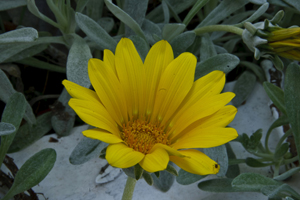
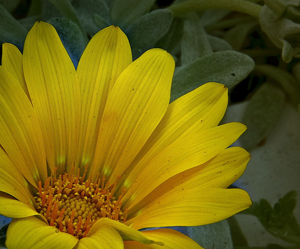
      This is the original photograph. Since there are no edits it clearly is a traditional photograph. So we set the level to traditional. Tight cropping and the image has been sharpened with software. We've also adjusted exposure, colors and contrast. In addition, we added slight vignette. So we have made many changes using software but the number of changes is not what impacts the mixed media level. When we compare the original photographed subject to the edited image, it is not something that different. So this is still a traditional photograph. But we do change the level. The final product. All the adjustments noted previously. But now we have made something different. The image is slightly rotated. We've changed the background and the colors. We have made other adjustments that have made this something different when compared to the original photo. We post this as a mixed media photography by adjusting the level.

      A special thanks to avmurray, 2011 Mixed Media Photographer of the Year, for providing the images used in the sample.

Back

What is Digital Art?

    In its purest sense, an image in which all elements are created solely on a computer.

    In what genres will I find digital art?

    We have artists that span several genres including abstract, realism and sci-fi/fantasy.

    What kinds of programs are used?

    There are many programs used by digital artists. The ones most commonly used on FanArtReview.com can be broken down into two categories: painting and 3D.

    Painting Programs:

    Two of the most popular are Photoshop and Paintshop Pro.

    These programs support both beginning and advanced artists. Some of the programs' simpler capabilities are the creation of basic shapes and lines, gradient coloring, preset manipulations and text. More advanced artists utilze the programs' ability to have muliple layers and masks, and create their manipulation presents to produce complex designs.

    Corel Painter is another popular program (though I am unsure if anyone on FanArtReview.com uses it) that is used by many digital painters to mimic the traditional arts in the digital realm. This program does not have the same versatility that Photoshop or Paintshop Pro has.

    Some artists use a "pen and tablet" which allows for pressure sensitivity to control the flow of the "paint" and other use a mouse.

    3D Programs

    Again, there are two programs that are commonly used on FanArtReview.com: Vue and Bryce. Vue is considered more advanced and requires little post-processing to produce good results.

    These two programs are primarily landscape generators, but can be used to create other types of scenes. The user can create primitive shapes (cones, spheres, cubes, sylinders, planes) and more complex shapes like terrains and boolean objects.

    There are many presets for atmospheres, lighting, materials, textures, reflections, plants, trees, etc, and more advanced users can create their own presets.

    During the creation process, the scenes are either in wire-frame or solid 2D. In Vue, you can view from the top, side, and front simultaneously. To see the results of added materials and atmophseres you must rend the scen which is a time-consuming experience. Rendering time is based on three major factors: shadows, reflections and polygons (the basic building block for 3D). Average full rendering time is about 5 or 6 hours, but can be (much) longer.

    How should I review digital art?

    Digital art is subject to the same rules of composition that the traditional and photographic arts are subject to, so it should be reviewed the same. With the 3D arts, photographic criteria such as exposure and lighting also can be a factor. In addition to these, how does the art make you feel? How much time, skill and effort went into the piece? All of these should play a part in your review.

Back

What type of Digital Art is supported?

    There are two primary types of digital art on the site. We breakdown digital art into Digital Paintings and Digital Composition which houses the different forms of art outlined below.

    Digital Painting

    1. 2D Art
      2D image created totally on the computer electronic blank canvas environment with the use of painting tools and effects that emulate natural media styles. Sometimes referred to as "Natural Media". This type of art makes limited use of plug-ins, filters and effects and is closer to the look of a traditonal painting on canvas. No use of tubes or stock photography.

    2. Digital Collage
      Combining many images from varying sources into one image. This is most commonly achieved by the use of layering techniques in image editing and paint software. The artist may make use of NON-PHOTOGRAHIC SCANNED material to produce elements within a specific collage composition that when finished do not in any way resemble the original scanned image. This art may make moderate to heavy use of plug-ins, special effects and filters to create designs, motifs, texture or other elements essential to the overall compositional work. No use of tubes or stock photography.

    3. Vector Drawing and Geometric Art
      Using vector drawing software to create an image totally in the virtual/blank canvas environment. This makes use of geometric shapes which are outlined and can be filled with various colors and patterns. This tends to produce a harder edged or graphic looking composition. The composition is entirely original in design and implementation. This art might also make use of painting and textural effects and limited use of plug-ins or other specialized filters. However, the integrity of the art remains a drawing or geometrically derived art. No use of tubes or stock photography.

    4. Integrated Digital Art or Digital Mixed Media Painting
      Art that is a blending of one or more of the above techniques/styles and yet is created completely by the artist's hand and imagination within a blank electronic canvas. No use of tubes or stock photography. The composition remains purely original in both concept and implementation. This art might include the heavy use of plug-ins, effects and filters and may make use of geometric shapes and forms to enhance the composition.

    Digital Composition

    1. Digital Creations
      Any digital artwork that makes use of tubes or stock photography. Images and compositions derived from the use of modeling and software to sculpt in virtual space. Stock photos that are permitted are any stock photo that is available for free or for purchase to the general public. Use of third party photos are permitted but not photos created by the artist. If using a photo you created post as a photo with the mixed media level at the highest level.

    2. Algorithmic/Fractals
      Art produced exclusively by mathematical manipulations. This is the art generated purely by the computer. The art here lies in the invention of the mathematical formulas themselves and the way the programs are written to take advantage of the display capabilities of the hardware. The art also lies in the creative intentions and subsequent selections of the artist/mathematician. This is art created exclusively from Fractals.

    3. Computer Generated Mixed Media Art
      Any computer generated art that also includes one or more of the above subcategories of Digital Composition art, as well as any element within the main Category of Digital Painting.
Back

What are warnings and how can I report abuse?

Every member is important to FanArtReview.com. FanArtReview.com works hard to ensure that the site is enjoyable by all members by enforcing the terms agreed to by members when they join.

If a member violates the terms warnings are sent via Private Message from the site host. The topic of a warning will include the word "Warning". If a member receives two warnings from a site admin it will lead to an automatic system ban based on computer identification. The site administrator has an option to ban a member without warning where appropriate.

All the terms of the site are enforced. These are specific areas where a member can report a problem.

  1. Personal attacks are not permitted. If you feel a review (or a forum post) is a personal attack you should contact the administrator. If it is a personal attack the administrator will delete it. The member that made the attack will be warned. In the case of a comment only report personal attacks on the artist. Attacks on the work - even harsh attacks - are permitted. If a comment is not a violation of site policy but is offensive to the artist, the artist has the option to remove the work from public view. That will, in turn, also remove all comments from public view. Normally artists are required to leave works up for three weeks but if offended by a review the work can be removed from public view prior to reaching that three week period. Artists should be aware that doing this will also impact the artists rating and ranking since the work will no longer be considered.
  2. If a reviewer is writing generic comments on your work and other works in a small period of time you have the option to contact the site admin to request removal. This does not include a single comment on a single work or a small number of generic comments on a small number of works. Reviewers will often leave generic comments to express to the artist that it was viewed and this is encouraged by the site. But if a large number of reviews are written in a short period of time (where it is apparent that the works are not being viewed) the admin has the option to delete the reviews. The reviewer will lose the points and credits earned. The reviewer will be warned.
In addition, an artist can receive a warning if:
  1. An artist posts a work as "New" when it is a revision (even if heavily revised). The work will be removed and the artist warned. Revisions are encouraged - but only on the original publication.
  2. Copyright violations will result in an immediate ban and may lead to further legal action. Only post it if you created it.
To contact a site admin click here.

Back

How do I become a ranked reviewer?

    On FanArtReview.com every qualifying reviewer is ranked. The top five reviewers are recognized with special icons. To become a reviewer you just need to write comments and earn points which are used to calculate your rank.

    A three month rolling window is used so all members - even new ones - have a chance for the top spot.

    Top reviewer signature icons.

      The hawk awarded to the fifth ranked reviewer
      The owl awarded to the fourth ranked reviewer
      The raven awarded to the third ranked reviewer
      The bat awarded to the second ranked reviewer
      The #1 ranked reviewer

    The next question, What are blue stars?, contains additional information on points and reviewing.

Back

What are blue stars?

    Each time you comment on a work posted you earn points and member cents. The number of points you have earned is shown in your profile.

    Most work rewards one point but posts with certificates (explained in detail here) may give out more. Points go towards the number of blue stars you that are shown in your signature.

    The more you comment on the more blue stars you will earn. In addition, you are ranked as a reviewer based on the number of points you earn when commenting.

    Points required to earn blue stars:

    = 10 points
    = 100 points
    = 250 points
    = 600 points
    When five blue stars are earned your stars are upgraded.
    = 1500 points
    = 2500 points
    = 5000 points
    = 10,000 points
    Nine stars are earned when a member earns 20,000 points. At this point a members name is surrounded by the stars earned.

    Additional stars are earned around the ring for each 10,000 milestone.

Back

How do I add my picture to the profile page?

  • First create an electronic image. This can be done with a digital camera. Also, most photo service locations allow you to turn standard pictures into digital images.
  • Edit and size your image. A good utility which comes with your (Windows) computer is "Paint". Use this utilty to size it correctly. If you don't get it exact that's ok. The site will resize it. But try to get close otherwise the quality of your image will not be as good.
  • Next convert it to a .JPG or .GIF. Utilities exist for doing this.
  • Edit your profile. Just view your profile tab and click the edit button . You can browse for the picture on your computer from the edit screen. Back

    How do I protect young viewers?

      The site contains thousands of artwork of varying content. Some contain adult content.

      The site follows and supports the Internet Content Rating Associations guidelines for labeling content. All artwork is rated by the artist and the ratings viewable by web browsers and software developed to protect younger viewers.

      If you are concerned about a child viewing adult content you should, at minimum, turn on the browsers parental controls. Or (recommended) purchase parental control software.

      Every work has content ratings built into it. The Internet Explorer browser has built into it content controls. You can preset the parental controls from the browser by entering the content advisor in Internet Explorer. After the controls are set your child will be able to freely browse the site but will not be able to view content that is rated higher than what you set. Artwork is ranked from 1-4 for violence, sexual content and language (one is less - four is more). You can, for example, set "3" for language but "2" for violence.

      In addition, the site has an adult section which requires viewers to agree that they are over the age of 18 and not offended by adult content. This protection is in addition to the content advisories.

    Back

    Artist Questions

    How do I know if I'm doing well?

       Your 
       Rating 
       
      As soon as your first work is commented on you will have a rating. This is the simple average of all your works. You can see the exact rating (for example 3.32) but other visitors will only see the number of stars earned (in this example you would have three). Stars are shown in your signature and on your profile.
       Your 
       Rank 
       
      All artists that qualify (have two posts and have commented on other work) are ranked. How well you rank is a clear measure of how you are developing as an artist. There are rankings for the year as well as an all time ranked artist listing. So each time you post watch your ranking. It will go up or down based on the comments written on your work. If you comment on other artists work you may see a slight rise in your ranking since your popularity will grow on the site.
       Recognized 
       
      The Recognized Ribbon is another goal for artists. When you release a work it shows up only on the available release art page or the available release photography page. Photographs, traditional art and digital art will only be added to the major listings if they make the grade. To be considered your work must have fourteen comments and must receive very good ratings by reviewers. When your work earns a ribbon the ribbon appears next to it and on the page where it is displayed. In addition, if your work continues to do well it may be selected for our "All Time Best" listing.

       All-Time Best Recognition 
       
      Work that is recognized may achieve this status if the reviews continue to be strong. Each night work that has been recognized is reviewed for this status based on the reviews written during that day and in the past.

       Diamond Seal 
       
      A very difficult but rewarding goal is to earn the FanArtReview.com Diamond Seal. Work selected to receive this seal passed through a rigorous review process. When you feel you have a work that is seal worthy you can nominate it (with a certificate). A committee of up to twenty members discuss and vote on works put before them. Members that earn a seal are considered pro level on the site.

    Back

    What are certificates and how do I use them?

      Answer by Tom Ens, site host

      First, let's look at the base question.

      What Are Certificates

      Certificates are used to encourage FanArtReview.com reviewers to review your work. The first certificate you will place on your work is called a "Base Certificate". A base certificate places your artwork or photograph on the available release page. It also offers a base amount of member cents and points to reviewers.

      That leads to the question: what are member cents? They are the FanArtReview.com currency that is used to buy these certificates. So if you write reviews you can earn member cents. You can use those member cents to buy a certificate for your own work.

      The available release page is sorted by member cents rewarded. The works that offer the most member cents to reviewers are listed higher on the page. So the work rewarding the most amount of member cents is in the first position. The work that is offering the next most is listed second - and so on.

      Now your base certificate does reward member cents. But not much. So you will likely want to reward more. To reward more member cents you use a "Member Cent Pump Certificate" This certificate simply increases the amount of member cents your work rewards. Each use will normally move it higher up the listing bringing it to the attention of more reviewers.

      That's really all there is to it. First, add a base certificate, next use bonus certificates (normally the member cent pump) to raise that position to a level where it will receive notice.

      And how do I use them? - the details

      There are two steps to using a certificate.

      1. Get one with member dollars. Write reviews to earn member dollars or buy them here.
      2. Use the certificate. Simply view your photograph or artwork and click the "Promote This" button on that page.

      There are the two primary driving factors for reviewers.

      • Points
      • Member Dollars

      PointsEach time a reviewer writes a review he or she earns points. Points earned will upgrade a members signature. In addition, they are used to track a reviewers place on the ranked reviewer listing.
      Member Dollars Purchases of certificates on FanArtReview.com are made using member dollars.

      The base number of points and member cents paid to a reviewer is very small (2 member cents and 1 point). Artists use certificates to place their writing on page one of the available release page and offer reviewers bonus member cents and points. The member cents rewarded by the work also determines the placement on the first page of the available release page. The more member cents offered - the higher on the list a work will be shown.

      It's important to note that all artwork and photography will receive reviews. When you first release your writing a complimentary certificate is placed on it. It's an excellent certificate. It offers bonus member cents and five points to each reviewer. It also offers a random chance at winning a certificate. The drawback is that it expires shortly after two reviews are written. So if you want more then two reviews you'll likely need to add additional certificates.

      As stated, all base certificates place a work on page one of the available release page. But remember that the more member cents offered to reviewers the higher it will be placed on the listing.

      Artwork and Photograph at the top of the listing will usually receive fifty or more reviews. Work at the bottom of the listing receive around six reviews. So artists can expect more reviews the closer they are to the top of the listing.

      I recommend starting with the treasure chest certificate. Next, purchase the artist weekly. This certificate does a terrific job of advertising your work in the forums and other places on the site. In addition it offers ten bonus points and member cents. Next, you can control your position on the listing using the Member Cent Pump certificate. It will move your writing higher on the listing.

      Click here for a full listing of certificates. Make purchases with your member dollars. You can earn member dollars by writing reviews or purchasing them here. To use a certificate simply view your work and click the promote it button that looks like this: .

    Back

    What is FanStory Registered Copyright?

      For any FanArtReview post an artist can receive a registered copyright certificate identifying the artist as the copyright owner of the work. In addition, FanArtReview provides date and time stamp protection as well as other means to secure the copyright personally to the artist. The FanArtReview copyright symbol demonstrates that this protection is in place.
    Back

    What type of work can I post? How do I specify the type?

      Classifying a work properly is important. Your selection will impact your rating, ranking and also how the work is shown. You select the type of work you post by answering the "Type" question when you make a post.

      Traditional Art
      Selecting traditional art or sculpture impacts your traditional art ranking and rating.


      Photography
      Selecting Photography classifies your work as a photograph. All photographs (even if heavily edited with computer software) should be placed under "photography".


      Digital Art
      Selecting Digital Art involves using computer software to create art. Art created solely on the computer. If you manipulate a photograph (or include a photograph in a work created on the computer) it is not digital art. It should be listed as photography.

      Note To Photographers Photos should not be placed on the digital art listing even if heavily edited with computer software.
    Back

    How do I sell my work?

      When you post your work the site will ask you if you wish to sell it. You can also put work that is already posted up for sale from your portfolio by clicking the "Sell It" link.

      When you specify that you wish to sell an artwork or photograph the site will ask you information about the work such as the price, description and size. It will immediately be made available on the site as a work for sale.

      You can specify that you would like to receive offers. In that case, no sale price will be listed. If an offer is made, or if a buyer wishes to contact the artist for other reasons, a "Contact Artist" screen is shown where FanArtReview.com communicates the correspondance from the buyer to you

      If a work is sold, the amount you charged is placed in your PayPal account. This is a commission free sale. FanArtReview.com does not take a percentage. When the funds settle you can request that PayPal write you a check or have the money electronically placed in your personal account.

      When an artwork is sold PayPal will contact you with the sale information including the buyers name, e-mail, and mailing address. It is the responsibility of the artist to ship the product.

      Work that is recognized is placed on our For Sale Listing and category listing. FanArtReview.com offers these works special preference since they are recognized by the site.

    Back

    What is a Lock and Key certificate?

      This certificate allows you to setup a artists workshop for a work that you post. It includes a private room with a forum. The posting and workshop area is only available to members that you invite (by sending a key). They can help you with the work until you mark it as finished. At that time it will appear as an available release available for comment by the public.

      You use the lock and key certifiate when you post (not after you post like most certificates). Once used, your work will be available from your lock and key workshop area. A link brings you to the private team room that you can use to send members keys. It is also recommended that you use the private forum in this room to welcome your reviewers. If there is something in particular that you are looking for help on you can request it in the forum.

      It is easy to release a lock and key work after the workshop work is finished. The work will appear as an entry on the available release page no matter how much time was spent editing it under lock and key. All the comments that were written under lock and key will be still be available from the comment page but only to the artist. Comments made under lock and key will never an impact an artists rating or ranking. Members that commented while it was under lock and key can comment again when it is public.

      Click here to buy a lock and key workshop certificate with your member dollars.

    Back

    How do I get ranked?


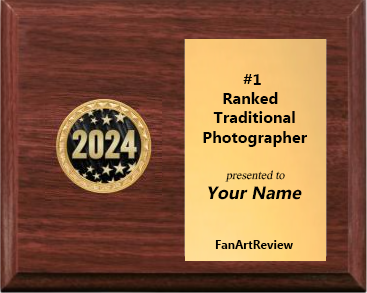
      The final top five artists and photographers from each of the four rankings of this year will receive this trophy with a wooden stand.
      The site ranks all photographers and artists that have posted two works. The rank is based on the ratings of the work posted. On FanArtReview.com every qualifying photographer, traditional artist, and digital artist is ranked. The top five for each category receive special recognition.

      To be ranked, an artist needs to post two works (in the proper category) that do well. Rank is primarily determined by looking at the artists overall rating (based on the reviews on his or her work). How well an artists work is received is also considered. For this the site looks at the number of reviews an artist is receiving.

      At the end of the year the top five ranked photographers, traditional artists, and digital artists are rewarded trophys based on their position for the year. One way for an artist to measure his or her skills is to compare their placement on the listings to other artists.


      The Top Five Photographers signature icons

        The fifth ranked photographer bear.
        The bear awarded to the fourth ranked photographer
        The third ranked photographer bear
        The second ranked photographer bear
        The #1 ranked photographer bear

      Top Traditional Artist signature icons.

        The Panther awarded to the fifth ranked artist
        The Tiger awarded to the fourth ranked artist
        The Cougar awarded to the third ranked artist
        The Lion awarded to the second ranked artist
        The #1 ranked artist lion

      Top Digital Artist signature icons.

        The dog awarded to the fifth ranked digital artist
        The Labrador retriever awarded to the fourth ranked digital artist
        The Bulldog awarded to the third ranked digital artist
        The German Shepard awarded to the second ranked digital artist
        The #1 ranked digital artist

      Tradtional Photographer Rankings | Traditional Artist Rankings | Mixed Media Photographers Rankings | Digital Artist Rankings

      For details on your ranking check your profile.

      Back

      What is the Diamond Award?

        The FanArtReview.com Diamond Seal is a recognized status for artwork. This seal is placed on artwork that is rewarded the seal from the FanArtReview.com Diamond committee. Artists can create a book collection of photographs or artwork (that contains at least five works) and request a review by the committee using a new certificate. This is the place to present your best work that adheres to a specific subject or theme. Try to avoid extreme variances in the visual flow from page to page.

        The purpose of the committee is to "Recognize Excellent and Professional Work". The committee will reply to the artist with comments about the work and the final decision on whether it will be rewarded a Diamond Seal.

        If it is awarded the seal, FanArtReview.com will upgrade that members signature to professional level, the work in the book will appear with the diamond seal, and the work will appear on a special listing that will list diamond recognized works.

        For each book that is awarded a Diamond Award the artists professional status will be raised. So, for example, if two books are awarded the seal the level will be listed as "Level 2 Pro".

        Artists interested in requesting a review by the committee can use their member dollars to buy a Diamond Review Request certificate from their certificate page. Next, place it on the first page in the book created. For instructions on how to create a collection click here.

      Back

      Should I reply to the comments made on my work?

        Yes! If you reply your reviewers will know that you are reading the comments. If they don't see replies they are not likely to comment in the future. A quick "thanks" goes a long way. You can also contact them via private messages but those are private and others will not know you are reading the comments. So for specific questions feel free to send a private message but we recommend doing this only after you replied.

      Back

      What type of artwork are supported?

        Traditional art, digital art, photography, sculptures, mixed media, abstract, architecture, drawings and much, much more. You can place your works as stand-alones or organize them in books.

        Multi-Artist books allow any artist on the site to add a page to it. These are often used for competitions or special topics since they organize work well.

      Back

      How do I convert a posting into a book collection?


        1. Create a book collection
        2. After you create the book the site will prompt you to either A) add your first entry or B) add existing work to the book. Choose the second option.
        3. From your portfolio locate the work you wish to add to the book.
        4. Click the "Add To A Collection" button. Select your book from the list.
        5. The site will bring you to the edit screen. Specify a page number and save it.
        6. Continue at step three for each work that you wish to add to this book collection.
      Back

      What do I do if I get an unfair comment?

        Generally, nothing. Everyone will receive what they feel is unfair reviews. You are posting to the general public and not everyone will enjoy your work. The site strongly encourages tough and honest comments even when a reviewer disagrees with the majority of the reviewers. While FanArtReview.com reserves the right to remove any content, it rarely does so.

        But there are protections built into the site. For example, your artist average (shown in red stars) is not a simple average. Like competitive events (such as figure skating) the highest score and lowest score are not included once a work has received ten comments.

        If you feel a member is being unfair you have the option to to mute that member. View that members profile and click the "Mute" button. Members that are muted do not have the ability to contact the artist that muted them and can not review or buy their work. Only three members may be muted by an artist in this fashion.

        But the best protection you have against unfair ratings is to have a large number of reviews for each work you post. That gives the site more information to use when calculating the number of stars to show for your work. It also uses these comments when determining your overall artist ranking.

        Your overall artist rank is calculated not just by looking at the averages of the comments on your work (although that is the largest factor) but also by looking at your popularity and by looking at the individuals that commented on your work. That said, the more ratings you receive the more accurate your rating will be. "Unfair" ratings are a negligible factor in both an individual rating as well as an artist ranking when an artist is supported by many comments.

        Lastly, reviewers should be aware that all comments are made in public. The large majority of artists and reviewers read these public comments. The community as a whole will be aware of the reviewers that are not rating honestly.

        The only time you should contact a site administrator is if A) a review is a personal attack or B) a review to your work is a clear "revenge rating". A "revenge rating" is a comment that is written by another artist to "pay you back" for a negative review. Even if no action is taken the site will track complaints of this nature.

        Post with confidence that everything that can be done to make your artist ranking accurate, is done. The site is aware of the nature of a public system on the internet and was built to support it.

      Back

      What type of artwork can I publish?

      Back

      Can I delete something I posted?

        Yes, edit it. The last question on the edit screen is "Release Mode". Select "disabled". That will remove it from public view.

        Any comments you received on a disabled work will no longer count towards your artist rank or rating. It will remain in your portfolio as a disabled work (so only you and the site admins can see it). At this point you have the option to release it again or to delete it permanently.

        Disabling a work is useful for something that you released and immediately regretted doing so. It gives you time to edit it without anyone being able to review it. But keep in mind the original release date stays the same.

        A work can never be "reposted" again. Even heavily modified work can not be presented as new. This rule is for the benefit of our reviewers (so they don't read a "new" work to find that it is just an edited work) and to keep the "playing field" fair.

        But since disabled works are treated as "deleted" by the site it is an excellent way to "wipe out" past mistakes.

        Note:If your work is part of a contest do not disable it. It will remove it from the contest.
      Back

      If I post my work here do I lose rights to it?

        No. You retain copyright to your works.
      Back

      How are the nominees for the Artwork and Photograph of the month selected?

        Each month we select nominees for three votes. We offer the Traditional Artwork of the Month vote (on our around the 1st of the month), the Photograph of the Month vote (on or around the tenth of the month) and the Digital Artwork of the Month vote (on or around the 20th of the month).

        The host of the site selects between five and ten works that have earned good ratings from reviewers to be a part of the voting booth. The members of the site determine the winner.

      Back

  • Share or Bookmark
    Contact Us | Start Reviewing | Art For Sale | Post Artwork | Post Photography | Contests | Advertise With Us

    © 2013 FanStory.com, Inc. All Rights Reserved. Terms under which this service is provided to you. Privacy Statement